

Point clouds have become a fundamental tool in surveying, architecture, engineering and many other technical disciplines. If you work in any of these fields, you have surely heard about them. But do you really know what they are, how they are generated, or what they can be used for? At Global Geosystems, we explain the 10 things you need to know about point clouds, whether you are just starting out or already experienced but want to go deeper.
1. What is a point cloud?
A point cloud is a three-dimensional digital representation of a real object or space made up of millions of points. Each point has spatial coordinates (X, Y, Z) and, in many cases, additional attributes such as colour, intensity or capture time. When visualised together, these points reveal the complete geometry of a building, a terrain or even an entire city with remarkable fidelity. It is like a 3D photograph where, instead of pixels, you have points floating in space. Each one describes millimetre-level precision for every detail.
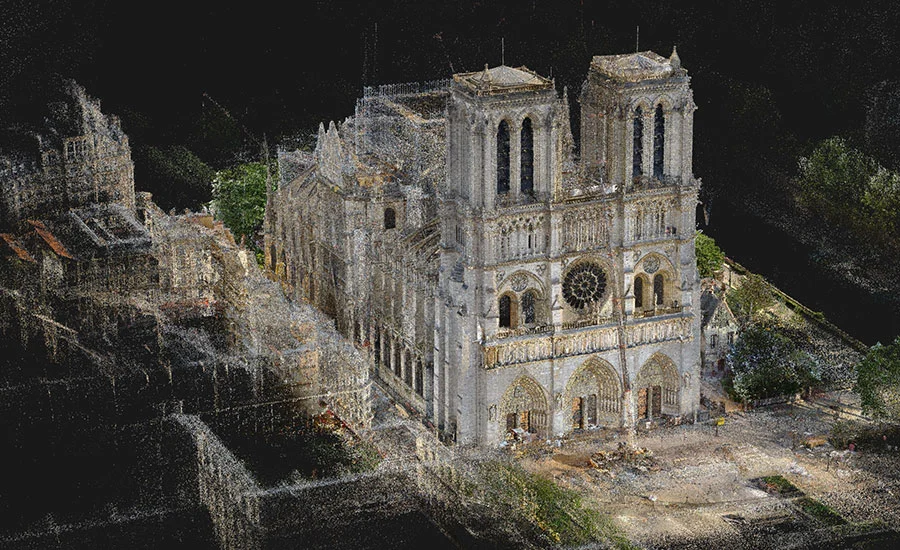
An example that went around the world: Notre-Dame
When a fire destroyed much of the roof and spire of Notre-Dame Cathedral in Paris in April 2019, reconstruction seemed almost impossible. However, the solution had already been recorded… in a point cloud. Years earlier, art historian and 3D modelling specialist Andrew Tallon had scanned the cathedral using a terrestrial laser scanner. Thanks to that scanning campaign, a complete point cloud of Notre-Dame was generated with millimetre accuracy, capturing not only the overall shape of the building, but also its structural deviations, sculptural details and asymmetries.
This point cloud was key to the restoration. It was not just an image: it was an objective geometric record of the cathedral’s condition before the fire. Engineers and architects were able to rely on this data to design a faithful reconstruction, without depending solely on old drawings or photographs.
More than data: a living model
The story of Notre-Dame reminds us that a point cloud is not just an abstract “cloud”. It is a tool of incalculable value that enables you to:
- Preserve architectural heritage
- Make decisions based on real data
- Plan interventions safely and efficiently
And the best part is that it doesn’t have to be a cathedral to justify a point cloud. Today, point clouds are used in all kinds of projects: from single-family homes to factories, civil engineering works or archaeological sites.
2. How are point clouds generated?
Point clouds can be generated using different 3D capture technologies. Although all of them aim to obtain an accurate representation of the environment, they work in very different ways. These are the most commonly used:
Terrestrial laser scanners / HDS (Leica RTC360, Leica BLK360, etc.)
Terrestrial laser scanners operate by emitting laser pulses that bounce off surrounding surfaces. By measuring the time it takes for the laser to return, the scanner calculates the distance to each point and generates millions of measurements in just a few minutes. Leica Geosystems, a leading brand in surveying, offers some of the most advanced equipment on the market:
- RTC360: designed for demanding projects requiring speed, precision and automation. It automatically registers scan positions using inertial sensors (VIS).
- BLK360: ultra-compact and easy to use, ideal for architecture, interior design and heritage documentation.
Terrestrial laser scanners such as the Leica RTC360 or BLK360 stand out for their extremely high millimetric accuracy, making them the ideal choice for architectural documentation, construction monitoring and projects that require exact detail of the environment. Their ability to capture millions of points in minutes, even outdoors or on construction sites, saves time and improves the reliability of fieldwork. In addition, models like the RTC360 integrate inertial sensors that automate scan registration, reducing office time and streamlining workflows toward BIM or CAD software.
Drone-mounted LiDAR systems (DJI Zenmuse L1 and L2)
Drone-mounted LiDAR systems, such as DJI’s Zenmuse L2, offer a major advantage when it comes to surveying large areas or hard-to-access locations, such as forested zones, slopes or rural environments. Their ability to penetrate vegetation and generate accurate digital terrain models, even beneath tree canopies, makes them a key tool for surveying, mining, civil engineering and environmental management. The speed at which large surfaces can be covered is unmatched compared to traditional methods.
Photogrammetry
Finally, photogrammetry stands out as an accessible and cost-effective solution. All that is required is a camera (even a drone or smartphone) and specialised software to generate 3D models from images. It delivers visually rich results with realistic, detailed textures and is particularly useful for documenting façades, monuments or archaeological sites, provided there is good lighting and contrast. For many professionals, it is the gateway into the world of 3D modelling.
3. What are point clouds used for?
Point clouds are extremely versatile and are used across a wide range of technical and creative fields. Their value lies in providing an objective, three-dimensional representation of reality that can serve as the basis for analysis, design, documentation or reconstruction. In surveying and civil engineering, they are used to generate digital terrain models, calculate volumes, track construction progress and compare actual conditions with design intent. Their accuracy is crucial for linear infrastructure, earthworks and complex layout tasks.
In the architecture and BIM world, point clouds are the first step toward creating 3D models of existing buildings. A well-registered cloud allows extraction of plans, sections and geometries for renovation, extension or refurbishment within an interoperable digital environment. To make this process fully effective, it is essential to have the right tools and expertise to transform data into decisions. That is why more and more architectural studios and engineering firms rely on specialised BIM consultancy services, providing support all the way to the final model.
In heritage documentation, point clouds make it possible to digitally preserve monuments, sculptures and historic buildings exactly as they exist at a given moment. This is essential for restoration projects or in the event of losses caused by disasters, as happened with Notre-Dame.
They are also widely used in industry and manufacturing for reverse engineering: scanning an existing part and generating a CAD model from it. This is a highly effective solution for redesigns, precision adjustments or spare-part production.
Finally, in emerging areas such as virtual reality and digital simulation, point clouds serve as the foundation for recreating real environments in virtual worlds. This is useful in video games, industrial training, virtual tours and immersive user experiences.
4. Accuracy and resolution: are they the same?
Although often used interchangeably, accuracy and resolution do not mean the same thing in the context of a point cloud. Understanding the difference is key to choosing the right equipment or interpreting scan results.
Accuracy refers to how close the points are to their true spatial position. In other words, how much error exists relative to reality. A high-end laser scanner like the Leica RTC360 can deliver millimetre-level accuracy, which is essential in technical projects with tight tolerances.
Resolution, on the other hand, describes point density on a surface. Higher resolution means more points per square metre, resulting in greater visual detail. However, a cloud with many points is not necessarily more accurate—it is simply denser.
For example, you can have a very high-resolution scan of a sculpture, but if the scanner is poorly calibrated or scanning conditions are inadequate, accuracy may suffer. Conversely, a scan can be accurate but low-resolution if it was captured quickly or with reduced point density.
In practice, the ideal approach is to balance accuracy and resolution depending on project objectives. For BIM modelling, accuracy may matter more than resolution; for visualisation or virtual tours, higher visual density may be prioritised.
5. What software is used to work with point clouds?
Once a point cloud has been generated, specialised software is required to visualise, edit or convert it into a usable model. Some of the most widely used tools include:
- Leica Cyclone / Register360: professional tools for registering, cleaning and preparing point clouds captured with laser scanners. Widely used in construction and architecture.
- Autodesk ReCap: ideal for viewing, cropping and exporting point clouds to platforms such as Revit or AutoCAD. Compatible with many formats.
- CloudCompare: powerful open-source software for comparing clouds, aligning datasets, measuring distances and performing analysis. Lightweight and flexible, though less intuitive for beginners.
- Archicad / Revit / SketchUp: BIM or 3D modelling platforms that allow point clouds to be imported as references for design. Essential in refurbishment and scan-to-BIM workflows.